Quickstart with Goldsky
This quickstart uses the RedStone multi-feed adapter as an example event source. The same Goldsky workflow applies to other contracts: provide the contract address, ABI, network, and start block, then deploy an instant subgraph.
Install & log in
Install the CLI and log in:
goldsky loginCreate the instant subgraph config
Save this as adapter.json:
{
  "version": "1",
  "name": "redstone-adapter",
  "abis": {
    "adapter": [
      {
        "anonymous": false,
        "inputs": [
          { "indexed": false, "internalType": "uint256", "name": "value", "type": "uint256" },
          { "indexed": false, "internalType": "bytes32", "name": "dataFeedId", "type": "bytes32" },
          { "indexed": false, "internalType": "uint256", "name": "updatedAt", "type": "uint256" }
        ],
        "name": "ValueUpdate",
        "type": "event"
      },
      {
        "anonymous": false,
        "inputs": [
          {
            "indexed": false,
            "internalType": "uint256",
            "name": "blockTimestamp",
            "type": "uint256"
          }
        ],
        "name": "UpdateSkipDueToBlockTimestamp",
        "type": "event"
      },
      {
        "anonymous": false,
        "inputs": [
          { "indexed": false, "internalType": "bytes32", "name": "dataFeedId", "type": "bytes32" },
          {
            "indexed": false,
            "internalType": "uint256",
            "name": "dataTimestamp",
            "type": "uint256"
          },
          {
            "indexed": false,
            "internalType": "uint256",
            "name": "lastDataTimestamp",
            "type": "uint256"
          }
        ],
        "name": "UpdateSkipDueToDataTimestamp",
        "type": "event"
      }
    ]
  },
  "instances": [
    {
      "abi": "adapter",
      "address": "0x4154f0e4dc70DFA4219309fBea34322225E17b68",
      "startBlock": 1,
      "chain": "eden"
    }
  ]
}
Deploy the instant subgraph
goldsky subgraph deploy eden-redstone-adapter/1.0 --from-abi adapter.jsonCheck sync in the dashboard or list subgraphs via CLI:
goldsky subgraph listTest a query (in the endpoint's GraphiQL)
Using your deployed GraphQL endpoint (shown in the Goldsky dashboard or from goldsky subgraph list), you can query the subgraph for data. Endpoint format:
https://api.goldsky.com/api/public/project_<PROJECT_ID>/subgraphs/<SUBGRAPH_NAME>/<VERSION>/gn
For a current working demo endpoint, see
eden-goldsky-redstone-demo/main.js.
For example, to get the latest value updates from the RedStone adapter:
{
  valueUpdates(first: 5, orderBy: updatedAt, orderDirection: desc) {
    id
    value
    dataFeedId
    updatedAt
    block_number
    transactionHash_
    timestamp_
  }
}
You can filter by a specific data feed ID (in this case, TIA where TIA = 544941 in hex)
{
  valueUpdates(
    first: 10
    where: { dataFeedId: "0x5449410000000000000000000000000000000000000000000000000000000000" }
    orderBy: updatedAt
    orderDirection: desc
  ) {
    id
    value
    dataFeedId
    updatedAt
    block_number
    transactionHash_
  }
}
Using the indexed data in your frontend
Here's a simple HTML page that displays live price feeds from your subgraph. You can replace the
SUBGRAPH_URL with your own subgraph URL:
<!doctype html>
<html>
  <head>
    <title>Eden price feeds</title>
    <style>
      body {
        font-family: -apple-system, BlinkMacSystemFont, 'Segoe UI', sans-serif;
        max-width: 600px;
        margin: 40px auto;
        padding: 20px;
      }
      h1 {
        color: #333;
      }
      .price-card {
        background: #f8f9fa;
        border-radius: 8px;
        padding: 16px;
        margin: 12px 0;
        border-left: 4px solid #0066cc;
      }
      .price-card.tia {
        border-left-color: #7b2bf9;
      }
      .price-card.eth {
        border-left-color: #627eea;
      }
      .symbol {
        font-weight: bold;
        font-size: 18px;
        margin-bottom: 8px;
      }
      .value {
        font-size: 24px;
        color: #0066cc;
      }
      .timestamp {
        color: #666;
        font-size: 12px;
        margin-top: 8px;
      }
      .loading {
        color: #999;
      }
    </style>
  </head>
  <body>
    <h1>Eden RedStone oracle + Goldsky indexer</h1>
    <div id="prices" class="loading">Loading prices...</div>

    <script>
      // Replace with your actual Goldsky subgraph endpoint
      const SUBGRAPH_URL = 'YOUR_GOLDSKY_SUBGRAPH_URL'

      async function fetchAndDisplayPrices() {
        try {
          const response = await fetch(SUBGRAPH_URL, {
            method: 'POST',
            headers: { 'Content-Type': 'application/json' },
            body: JSON.stringify({
              query: `{
                            valueUpdates(first: 20, orderBy: updatedAt, orderDirection: desc) {
                                value
                                dataFeedId
                                updatedAt
                            }
                        }`
            })
          })

          const { data } = await response.json()
          const container = document.getElementById('prices')

          // Group updates by feed ID to get latest price for each
          const latestPrices = {}
          data.valueUpdates.forEach(update => {
            if (!latestPrices[update.dataFeedId]) {
              latestPrices[update.dataFeedId] = update
            }
          })

          // Clear and render
          container.innerHTML = ''
          container.className = ''

          Object.values(latestPrices).forEach(update => {
            // Detect feed type from the dataFeedId
            const isETH = update.dataFeedId.startsWith('0x455448')
            const isTIA = update.dataFeedId.startsWith('0x544941')

            const symbol = isETH ? 'ETH' : isTIA ? 'TIA' : 'Unknown'
            const cssClass = isETH ? 'eth' : isTIA ? 'tia' : ''

            // Convert value (8 decimal places)
            const price = (Number(update.value) / 1e8).toFixed(4)

            // Format timestamp
            const date = new Date(update.updatedAt * 1000)
            const timeAgo = getTimeAgo(date)

            container.innerHTML += `
                        <div class="price-card ${cssClass}">
                            <div class="symbol">${symbol}/USD</div>
                            <div class="value">$${price}</div>
                            <div class="timestamp">Updated ${timeAgo}</div>
                        </div>
                    `
          })
        } catch (error) {
          document.getElementById('prices').innerHTML =
            '<div style="color: red;">Error loading prices. Check console for details.</div>'
          console.error('Failed to fetch prices:', error)
        }
      }

      function getTimeAgo(date) {
        const seconds = Math.floor((new Date() - date) / 1000)
        if (seconds < 60) return `${seconds} seconds ago`
        const minutes = Math.floor(seconds / 60)
        if (minutes < 60) return `${minutes} minute${minutes > 1 ? 's' : ''} ago`
        const hours = Math.floor(minutes / 60)
        return `${hours} hour${hours > 1 ? 's' : ''} ago`
      }

      // Initial load
      fetchAndDisplayPrices()

      // Refresh every 10 seconds
      setInterval(fetchAndDisplayPrices, 10000)
    </script>
  </body>
</html>
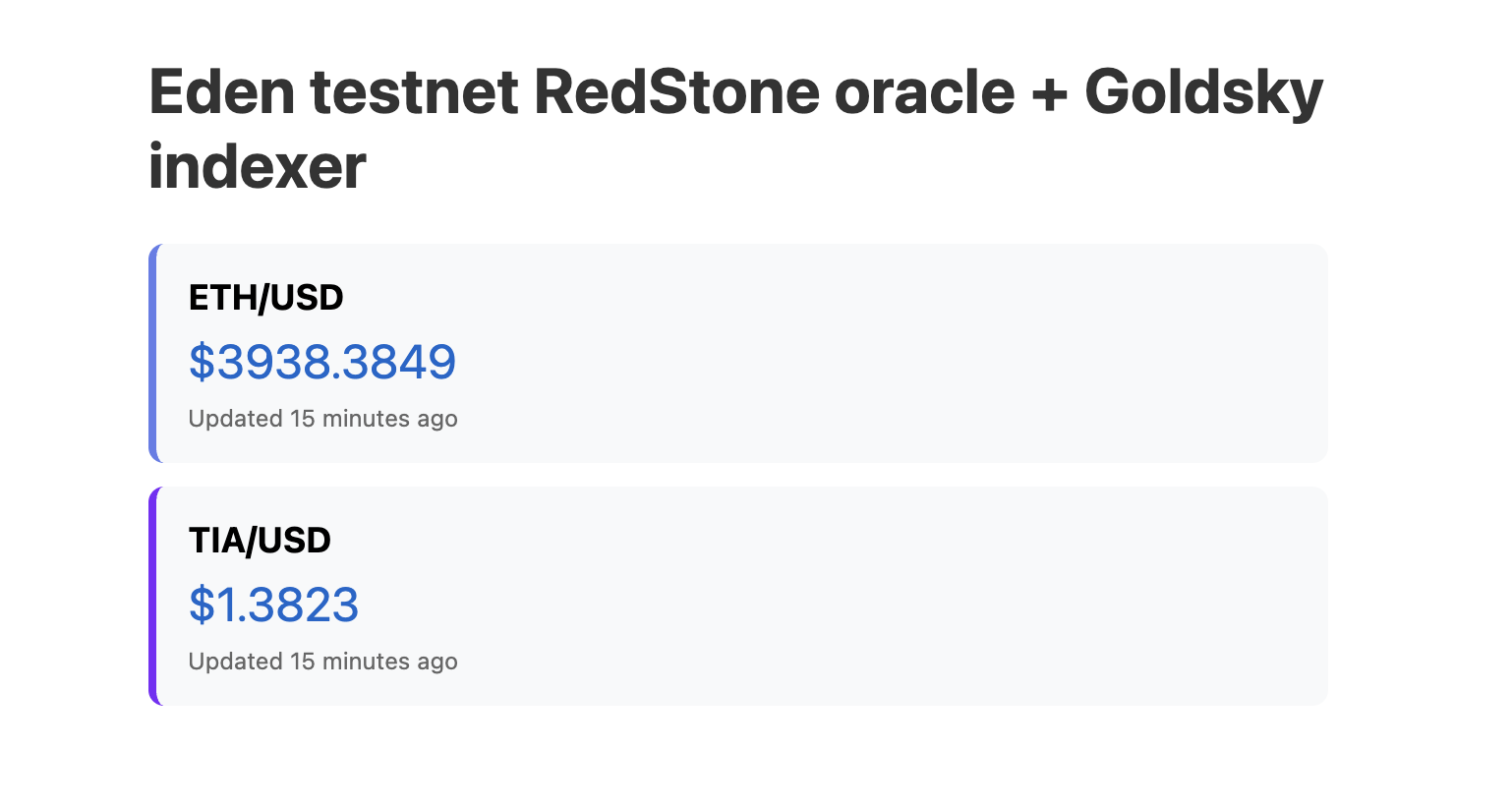
This is what your HTML will look like in the browser: